Calculation of Polarization Data Using Baumer GAPI SDK [AN201904]
Baumer Cameras: VCXU-50MP, VCXG-50MP
Software: Baumer GAPI SDK v2.9.2 and above
Baumer polarization cameras provide the ability to measure the intensity and polarization of the received image. This allows you to use polarization information in your application. This Application Note explains how to obtain polarization information.
Technical Background
Baumer polarization cameras are based on the Sony IMC250MZR sensor. This sensor is covered with a metal mesh that filters polarization information from 4 adjacent pixels. The polarization angle is filtered by alignment of 0°, 45°, 90° and 135°.
With this information the following data can be calculated:
- Angle of Polarization (AOP)
- Degree of Linear Polarization (DOLP)
- Linear Polarization Angle and Degree (Angle-And-Degree-Of-Linear-Polarization, ADOLP)
- Image Density
Using the Polarization Camera with Baumer GAPI SDK
The camera only provides raw data about polarization. Calculation of different polarization formats is done on the host system with the Baumer GAPI SDK. This reduces the required bandwidth by transferring data only once, rather than separately for each polarization format (AOP, DOLP, ADOLP, Density).
Polarization Camera Features Explained
Standardized SFNC features “ComponentSelector” and “ComponentEnable” Using GenICam™ compatible software can recognize that the camera is providing raw polarized data. These properties cannot be modified (read only).
The following features should be checked for identification:
ComponentSelector = PolarizedRaw
ComponentEnable = True
In order to ensure broad compatibility with third-party software, Baumer has not introduced special image formats. Raw polarized data is transferred using the standard formats Mono8, Mono10, Mono12 or Mono12p.
Additionally, the camera has “Calibration Control” It offers the necessary features for calibration under the category. These properties are filled with values calibrated by Baumer. If necessary, use “DeviceResetToDeliveryState” The command resets these values to the calibrated values provided by Baumer.
| GenICam Special Baumer Features | |
|---|---|
| CalibrationControl | Category |
| CalibrationAngleOfPolarizationOffset (R/W) |
“CalibrationAngleOfPolarizationOffset” feature can be used to change the offset of the polarization angle to correct manufacturing tolerances and deviations in the camera system. |
| CalibrationMatrixValue (R/W) CalibrationMatrixValueSelector (R/W) |
The calibrated matrix is used to correct sensor effects and increase the accuracy of polarization measurements. Generally these values should not be changed by the customer. |
note
“CalibrationAngleOfPolarizationOffset” and “CalibrationMatrixValue” features are written directly to the camera flash memory. This is quite slow compared to a normal property access. Changing these values too frequently may also shorten the maximum lifespan of the flash memory.
Description of Baumer GAPI SDK Features: For Calculating Polarization Data
Calculation of different polarization formats is done in the host system using the Baumer GAPI SDK.
The following examples:
- 020_Polarized_SinglePart
- 021_Polarized_MultiPart
It shows how to do this step by step.
note
Calculating polarization formats is quite challenging. To achieve good performance, the AVX2 vector extension of the processor is used. This feature is available starting from Intel Haswell and AMD Excavator architectures. Without AVX2, the performance of the algorithm will decrease significantly.
There are two methods on how to process data to ensure that the calculation uses as few resources as possible and achieves high frame rates. The most important configurations and usage of software features are explained here.
If only one polarization format (AOP, DOLP or ADOLP) is needed for an application, it is best to use a monolithic image object. A monolithic image object contains exactly one image.
// Acquire an image to a bufferBGAPI2::Buffer* pBufferFilled = pDataStream->GetFilledBuffer(1000);
bo_uint width =static_cast(pBufferFilled->GetWidth());
bo_uint height =static_cast(pBufferFilled->GetHeight());
void* pImageData = pBufferFilled->GetMemPtr();
bo_uint64 imageDataSize = pBufferFilled->GetMemSize();

//Create an Image object using the ImageProcessorpImageProcessor =newBGAPI2::imageprocessor();
pImage = pImageProcessor->CreateImage(bufferWidth, bufferHeight,"BaumerPolarized8", pImageData, imageDataSize);//orpImage->init(bufferWidth, bufferHeight,"BaumerPolarized8", pImageData, imageDataSize);// Enable all polarized formats (AOP, DOLP, ADOLP, Intensity)BGAPI2::Node* pCompSelector = pImage->GetNode("ComponentSelector");
BGAPI2::NodeMap*pComponents = pCompSelector->GetEnumNodeList();
for(bo_uint64 i =0; i < pComponents->GetNodeCount(); i++)
{
    pCompSelector->SetInt(i);
    pImage->GetNode("ComponentEnable")->SetBool( true);
}// Calculate all the polarization formats from the raw image to a multi-part Image object.BGAPI2::Image* pMultiPartImage = pImageProcessor->CreateTransformedImage(pImage,"Mono8");

// Get necessary information about each multi-partBGAPI2::Node* pComponentSelector = pMultiPartImage->GetNode("ComponentSelector");
BGAPI2::Node* pComponentEnable = pMultiPartImage->GetNode("ComponentEnable");
BGAPI2::Node* pComponentOffset = pMultiPartImage->GetNode("ComponentOffset");
BGAPI2::Node* pComponentLength = pMultiPartImage->GetNode("ComponentLength");
const void*constpImageBuffer = pMultiPartImage->GetBuffer();

// Loop through the multi-part Image object to extract all the parts
for(std::set::const_iterator it = sComponents.begin(); it != sComponents.end(); it++)
{
    pComponentSelector->SetValue(it->c_str());

    std::string sComponent = pComponentSelector->GetValue().get();

    if(pComponentEnable->GetBool()) {
        bo_uint64 partLength = pComponentLength->GetInt();
        BGAPI2::Image* pComponent =NULL;
        if(partLength >0)
        {// Part is validbo_uint64 partOffset = pComponentOffset->GetInt();
            pComponent = pImageProcessor->CreateImage(width, height,"Mono8"
                , (char*)(pImageBuffer)+partOffset, partLength);
        }else{// Part is empty
            if(sComponent =="ADOLP") {// ADOLP is calculated from the AOP and DOLP images, therefore this
  // second transformation is necessary.pComponent = pImageProcessor->CreateTransformedImage(pMultiPartImage,"RGB8");
            }
        }if(pComponent)
        {// Whatever needs to be done with the polarization data goes here
            // doCustomCalculation(pComponent, sComponent);

            // Release the data when not needed anymorepComponent->release();
        }
    }
}
If more than one polarization format (for example, AOP and DOLP) is required in an application, it is better to use a multi-segmented image object. This way, all calculations can be done at once instead of calculating each format separately.
                // Acquire an image to a buffer
BGAPI2::Buffer* pBufferFilled = pDataStream->GetFilledBuffer(1000);
bo_uint width = static_cast(pBufferFilled->GetWidth());
bo_uint height = static_cast(pBufferFilled->GetHeight());
void* pImageData = pBufferFilled->GetMemPtr();
bo_uint64 imageDataSize = pBufferFilled->GetMemSize();

//Create an Image object using the ImageProcessor
pImageProcessor = new BGAPI2::ImageProcessor();
pImage = pImageProcessor->CreateImage(bufferWidth, bufferHeight, "BaumerPolarized8", pImageData, imageDataSize);
//or
pImage->Init(bufferWidth, bufferHeight, "BaumerPolarized8", pImageData, imageDataSize);

// Enable all polarized formats (AOP, DOLP, ADOLP, Intensity)
BGAPI2::Node* pCompSelector = pImage->GetNode("ComponentSelector");
BGAPI2::NodeMap* pComponents = pCompSelector->GetEnumNodeList();
for (bo_uint64 i = 0; i< pComponents->GetNodeCount(); i++)
{
    pCompSelector->SetInt(i);
    pImage->GetNode("ComponentEnable")->SetBool(true);
}

// Calculate all the polarization formats from the raw image to a multi-part Image object.
BGAPI2::Image* pMultiPartImage = pImageProcessor->CreateTransformedImage(pImage, "Mono8");

// Get necessary information about each multi-part
BGAPI2::Node* pComponentSelector = pMultiPartImage->GetNode("ComponentSelector");
BGAPI2::Node* pComponentEnable = pMultiPartImage->GetNode("ComponentEnable");
BGAPI2::Node* pComponentOffset = pMultiPartImage->GetNode("ComponentOffset");
BGAPI2::Node* pComponentLength = pMultiPartImage->GetNode("ComponentLength");
const void* const pImageBuffer = pMultiPartImage->GetBuffer();

// Loop through the multi-part Image object to extract all the parts
for (std::set::const_iterator it = sComponents.begin(); it != sComponents.end(); it++)
{
    pComponentSelector->SetValue(it->c_str());

    std::string sComponent = pComponentSelector->GetValue().get();

    if (pComponentEnable->GetBool()) {
        bo_uint64 partLength = pComponentLength->GetInt();
        BGAPI2::Image* pComponent = NULL;
        if (partLength > 0)
        {
            // Part is valid
            bo_uint64 partOffset = pComponentOffset->GetInt();
            pComponent = pImageProcessor->CreateImage(width, height, "Mono8"
                , (char*)(pImageBuffer) + partOffset, partLength);
        }
        else
        {
            // Part is empty
            if (sComponent == "ADOLP") {
                // ADOLP is calculated from the AOP and DOLP images, therefore this
                // second transformation is necessary.
                pComponent = pImageProcessor->CreateTransformedImage(pMultiPartImage, "RGB8");
            }
        }

        if (pComponent)
        {
            // Whatever needs to be done with the polarization data goes here
            // doCustomCalculation(pComponent, sComponent);

            // Release the data when not needed anymore
            pComponent->Release();
        }
    }
}
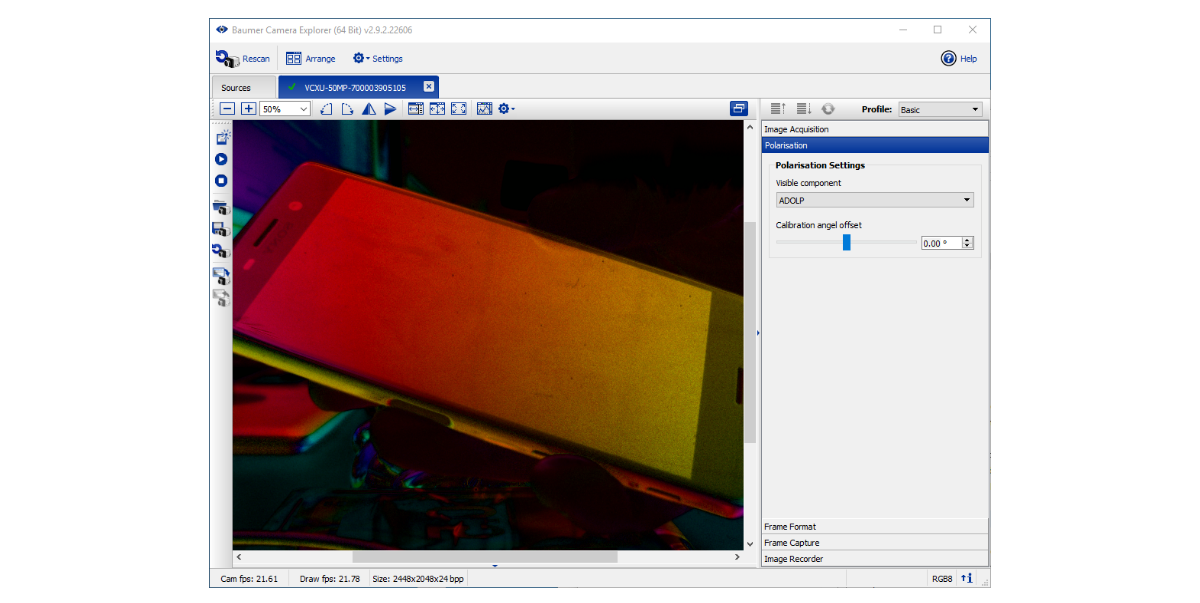
Using the Polarization Camera with Baumer Camera Explorer
Camera Explorer can also be used to view and save polarization data in AOP, DOLP, ADOLP and intensity formats.
Configuration is done in the Basic View using the polarization category.