Reliable 24/7 operation with camera temperature monitoring [AN201901]
Baumer cameras: LXG-250x, LXG-500x, LXC-250x, LXC-500x, VCXx (.I) (.I.XT) (only ≥ Version 2)
This document explains how to use configurable temperature thresholds and how to assign the emergency stop function to prevent the danger of camera overheating.
Technical Background
Industrial cameras are designed for reliable 24/7 operation and must provide consistent image quality for repeatable results. This requires that the camera be operated only within the allowed temperature range. Otherwise, the image quality will deteriorate as the camera temperature increases, and in case of insufficient heat dissipation, it may lead to camera damage. Therefore, cameras have “emergency shutdown” It offers the temperature feature.
Configurable temperature thresholds generate an alert as temperatures rise and allow the operator to intervene. In case of possible overheating, the camera automatically turns off at the maximum temperature limit.
Configuration
1. DeviceTemperatureStatusTransitionSelectorConfigure temperature thresholds using the feature (Category: Device Control):
| threshold | Description |
|---|---|
| NormalToHigh | The freely configurable temperature limit generates a warning event. |
| HighToExceeded | Permanent, camera specific limit for camera emergency stop. |
| ExceededToNormal | Freely configurable temperature for error-free camera restart. |
2. DeviceTemperatureStatusTransitionDefine the temperature for the selected threshold using the feature.
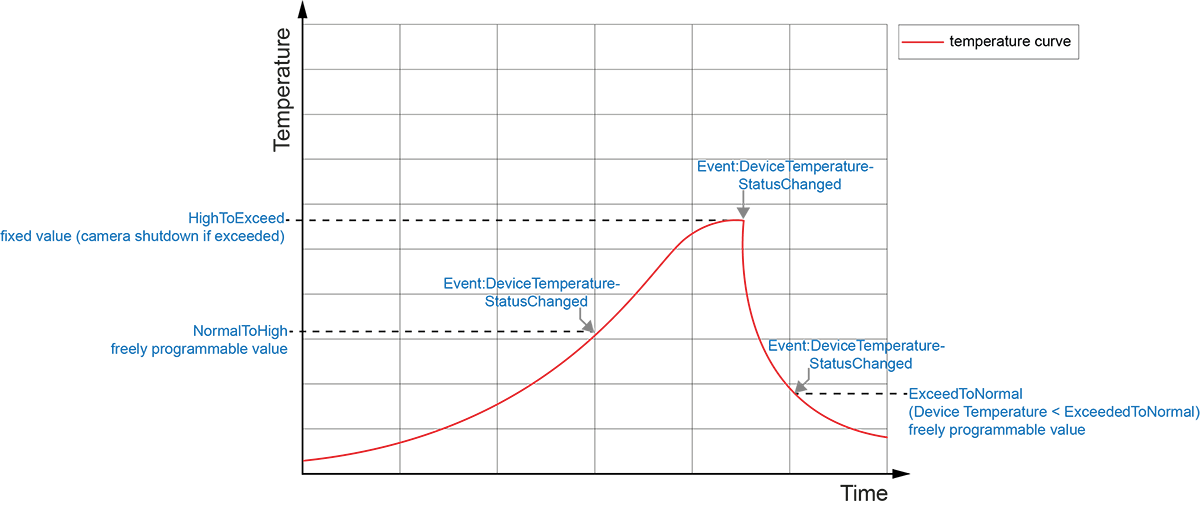
Procedure
- While the camera is operating, it heats up and reaches the value configured as NormalToHigh. This isDeviceTemperatureStatuschanges its properties andDeviceTemperatureStatusChangedOutputs the alert event.
- The camera continues to warm up and reaches the value configured as HighToExceeded.DeviceTemperatureStatusfeature changes again andDeviceTemperatureStatusChangedexplains the incident once again. Image acquisition stops and the camera's LED turns red.
- Let the camera cool down before continuing. Sufficient cooling,DeviceTemperatureStatusChangedvisualized by the exit event (Device Temperature < ExceededToNormal).
- In the next step, disconnect the camera feed or perform camera reset (Category:Device Control -> DeviceReset).
Attention
Proper camera mounting can prevent any emergency shutdown. Because the mounting options are so diverse, Baumer does not recommend a specific heat dissipation method, but offers the following recommendations:
- Only operate the camera when mounted. The camera should be mounted on a material with high thermal conductivity (for example, aluminum).
- Convection can ensure heat dissipation; Avoid any heat condensation!
- Do not keep other devices nearby that may contribute to the heating of the camera with their own thermal radiation.