Multicast for Machine Vision Applications [AN201805]
All Baumer cameras with Gigabit Ethernet and 10 Gigabit Ethernet interfaces and Baumer GAPI SDK v2.9.1 or higher
Since the GigE Vision standard is a true networking standard, it can be used to provide data from one server (Baumer GigE Camera) to many clients; this feature “multicast” It is called.
Home
In some applications, a camera may need to transfer images to multiple devices. For example, there may be an application where a process is monitored by an automated system but a separate system is needed for human observation. Baumer GAPI and Baumer cameras support this multicast mode. Multicasting can also be an interesting feature for distributing jobs across many clients. In this use case, many receiving clients can work on an image in parallel and simply send the results back to a central system; thus, the time required for complex machine vision analysis tasks can be reduced.
In a multicast scenario, a server (for example, a Baumer GigE camera) streams data to many devices on the network. However, only one device can turn on and configure the camera; all other receiving devices can read but not change the configuration and only receive the data stream as is.
Multicast can also be used to serve two independent applications running simultaneously on one system (PC).
Attention
To enable multicasting, the IP addresses of both the camera and receiving clients must be on the same local subnet. Make sure that all network components support multicast mode, because if configured incorrectly, multicast can create large amounts of unnecessary traffic on the network.
Baumer GAPI Multicast Example
SDK example103_Multicast.cppshows details of configuring the camera to use multicast. After compiling the example, you can start the application once and it will become the controller instance with read and write access to the camera. The application configures the camera to allow multicast, sets all other parameters and starts an image stream.
The following features control multicast for a Baumer Camera:
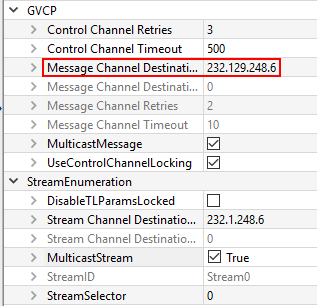
“MulticastStream”: This feature is “true” When set to , it enables multicast for the video stream and also sets a multicast IP address.
“StreamChannelDestinationAddress”: Indicates the IP address where multicast is provided.
“MulticastMessage”: This feature is “true” When set to , it enables multicast for camera events and also sets a multicast IP address.
“MessageChannelDestinationAddress”: Specifies the IP address from which multicast events are provided.
You can now start the instance a second time; this time the app will recognize that the camera is in read-only mode and start capturing images as a sub-app.