Baumer GAPI and OpenCV
Software example Baumer GAPI v2.9.0
In this guide, you will learn how to retrieve images from Baumer GAPI frame buffers and import them into OpenCV for further processing.
We will use the Baumer GAPI SDK to install the Baumer camera and store images. Then, we will transfer the images in memory to OpenCV and save them to the hard disk. Once imported into OpenCV, you can further process the images according to your needs using the library.
Importing images from Baumer GAPI to OpenCV
After Baumer receives the image data in GAPI, this data can be associated with an OpenCV matrix (Mat) using the overloaded constructor:
new cv::Mat::Mat(int _rows, int _cols, int _type, void * _data, size_t _step = 0Ui64);
                new Emgu.CV.Mat.Mat(int rows, int cols, Emgu.CV.CvEnum.DepthType type,
                    int channels, IntPtr data, int step);
The data in the Baumer GAPI memory buffer is not copied, but instead a pointer is passed to the OpenCV matrix. OpenCV matrix, thencv::imwrite()can be saved to disk using . After saving, you can delete or reuse the OpenCV matrix and use it to capture a new image by requeuing the Baumer GAPI memory.
Cloning, copying and converting Baumer GAPI buffer to OpenCV matrix
Baumer GAPI OpenCV for working with memory dataClone(), copy()orConvertTo()You can use the methods. After copying, the Baumer GAPI Memory can be requeued and the copied data can be further processed using OpenCV.
It is important to note that the OpenCV matrix contains width, height and type (CV_8UC1, CV_8UC3, CV_16UC1, CV_16UC3) information, while the Baumer GAPI memory containsBuffer.FrameID, Buffer. PixelFormat, Buffer.XOffset, Buffer.YOffsetIt also provides chunk data as well as additional useful information such as You may also need to copy this information if necessary.
                pDevice->GetRemoteNode("PixelFormat")->SetString("Mono8");

BGAPI2::Buffer* pBufferFilled = pDataStream->GetFilledBuffer(1000);
if (pBufferFilled->GetPixelFormat() == "Mono8")
{
    cv::Mat* imOriginal = new cv::Mat((int)pBufferFilled->GetHeight(),
                                      (int)pBufferFilled->GetWidth(),
                                      CV_8UC1,
                                      (char *)pBufferFilled->GetMemPtr());

    // 3 methods to copy
    cv::Mat imClone = imOriginal->clone();

    cv::Mat* imCopy = new cv::Mat((int)pBufferFilled->GetHeight(),
                                  (int)pBufferFilled->GetWidth(),
                                  CV_8UC1);
    imOriginal->copyTo(*imCopy);

    cv::Mat* imConvert = new cv::Mat((int)pBufferFilled->GetHeight(),
                                     (int)pBufferFilled->GetWidth(),
                                     CV_8UC1);

    imOriginal->convertTo(*imConvert, CV_8UC1, 1.0);

    delete imOriginal;
    pBufferFilled->QueueBuffer();

    // Use copied images
    cv::imwrite("cv_image_Clone.png", imClone);
    cv::imwrite("cv_image_Copy.png", *imCopy);
    cv::imwrite("cv_image_Convert.png", *imConvert);

    delete imCopy;
    delete imConvert;
}
                mDevice.RemoteNodeList["PixelFormat"].Value = "Mono8";

BGAPI2.Buffer mBufferFilled = mDataStream.GetFilledBuffer(1000);
if (mBufferFilled.PixelFormat == "Mono8")
{
    Emgu.CV.Mat imOriginal = new Emgu.CV.Mat((int)mBufferFilled.Height,
                                             (int)mBufferFilled.Width,
                                             Emgu.CV.CvEnum.DepthType.Cv8U, 1,
                                             (IntPtr)mBufferFilled.MemPtr,
                                             (int)mBufferFilled.Width * 1);

    // 3 methods to copy
    Emgu.CV.Mat imClone = imOriginal.Clone();

    Emgu.CV.Mat imCopy = new Emgu.CV.Mat((int)mBufferFilled.Height,
                                         (int)mBufferFilled.Width,
                                         Emgu.CV.CvEnum.DepthType.Cv8U, 1);
    imOriginal.CopyTo(imCopy);

    Emgu.CV.Mat imConvert = new Emgu.CV.Mat((int)mBufferFilled.Height,
                                            (int)mBufferFilled.Width,
                                            Emgu.CV.CvEnum.DepthType.Cv8U, 1);

    imOriginal.ConvertTo(imConvert, Emgu.CV.CvEnum.DepthType.Cv8U, 1.0);

    mBufferFilled.QueueBuffer();

    // Use copied image
    Emgu.CV.CvInvoke.Imwrite("cv_image_Clone.png", imClone);
    Emgu.CV.CvInvoke.Imwrite("cv_image_Copy.png", imCopy);
    Emgu.CV.CvInvoke.Imwrite("cv_image_Convert.png", imConvert);
}
Understanding PixelFormats
Baumer cameras support various PixelFormats such as Mono8, Mono12, BGR8 and these need to be mapped to the corresponding OpenCV formats. In the table below you can see the matching OpenCV Matrix Types.
| Baumer format | OpenCV format |
|---|---|
| mono8 | CV_8UC1, (8 bits, 1 channel) |
| mono10 | Convert to mono16 (bit-shift) |
| Mono12 | Convert to mono16 (bit-shift) |
| Mono16 | CV_16UC1, (16 bits, 1 channel) |
| BGR8 | CV_8UC3, (8 bits, 3 channels) |
| BGR10 | Convert to BGR16 (bit-shift) |
| BGR12 | Convert to BGR16 (bit-shift) |
| BGR16 | CV_16UC3, (16 bit, 3 channels (BGR)) |
| RGB8 | cv::cvtColorconvert to BGR8 using |
| RGB10 | bit-shift to BGR16 andcv::cvtColorconvert with |
| RGB12 | bit-shift to BGR16 andcv::cvtColorconvert with |
| RGB16 | cv::cvtColorconvert to BGR16 using |
| BayerGB8, BayerRG8, BayerGR8, BayerBG8 | cv::cvtColorconvert to BGR8 using |
| BayerGB10, BayerRG10, BayerGR10, BayerBG10 | bit-shift to BGR16 andcv::cvtColorconvert with |
| BayerGB12, BayerRG12, BayerGR12, BayerBG12 | bit-shift to BGR16 andcv::cvtColorconvert with |
Working with images in PixelFormats that do not require conversion is quite simple, you can see this in the examples below.
Example: Mono8
                pDevice->GetRemoteNode("PixelFormat")->SetString("Mono8");

BGAPI2::Buffer * pBufferFilled = pDataStream->GetFilledBuffer(1000);
if (pBufferFilled->GetPixelFormat() == "Mono8")
{
	cv::Mat* imOriginal = new cv::Mat((int)pBufferFilled->GetHeight(),
	                                  (int)pBufferFilled->GetWidth(),
	                                  CV_8UC1,
	                                  (char *)pBufferFilled->GetMemPtr();
	cv::imwrite("cv_Mono8_image.png", *imOriginal);
	delete imOriginal;
}
pBufferFilled->QueueBuffer();
                mDevice.RemoteNodeList["PixelFormat"].Value = "Mono8";

BGAPI2.Buffer mBufferFilled = mDataStream.GetFilledBuffer(1000);
if (mBufferFilled.PixelFormat == "Mono8")
{
    Emgu.CV.Mat imOriginal = new Emgu.CV.Mat((int)mBufferFilled.Height,
                                             (int)mBufferFilled.Width,
                                             Emgu.CV.CvEnum.DepthType.Cv8U, 1,
                                             (IntPtr)mBufferFilled.MemPtr,
                                             (int)mBufferFilled.Width * 1);
    Emgu.CV.CvInvoke.Imwrite("cv_Mono8_image.png", imOriginal);
}
mBufferFilled.QueueBuffer();
Example: BGR8
The standard color PixelFormat in OpenCV is the BGR format with 8 bits per color channel (CV_8UC3). Set PixelFormat to fit this format in the camera.BGR8You can set it as (BGR8Packedcan also be used).
                pDevice->GetRemoteNode("PixelFormat")->SetString("BGR8");

BGAPI2::Buffer * pBufferFilled = pDataStream->GetFilledBuffer(1000);
if ((pBufferFilled->GetPixelFormat() == "BGR8") ||
    (pBufferFilled->GetPixelFormat() == "BGR8Packed"))
{
    cv::Mat* imOriginal = new cv::Mat((int)pBufferFilled->GetHeight(),
                                      (int)pBufferFilled->GetWidth(),
                                      CV_8UC3,
                                      (char *)pBufferFilled->GetMemPtr());
    cv::imwrite("cv_BGR8_image.png", *imOriginal);
    delete imOriginal;
}
pBufferFilled->QueueBuffer();
                mDevice.RemoteNodeList["PixelFormat"].Value = "BGR8";

BGAPI2.Buffer mBufferFilled = mDataStream.GetFilledBuffer(1000);
if ((mBufferFilled.PixelFormat == "BGR8") ||
    (mBufferFilled.PixelFormat == "BGR8Packed"))
{
    Emgu.CV.Mat imOriginal = new Emgu.CV.Mat((int)mBufferFilled.Height,
                                             (int)mBufferFilled.Width,
                                             Emgu.CV.CvEnum.DepthType.Cv8U,
                                             3,
                                             (IntPtr)mBufferFilled.MemPtr,
                                             (int)mBufferFilled.Width * 3);
    Emgu.CV.CvInvoke.Imwrite("cv_BGR8_image.png", imOriginal);
}
mBufferFilled.QueueBuffer();
Converting PixelFormats to 16 Bit OpenCV Matrix Type
Some cameras support PixelFormats such as 12 bit (Mono12, RGB12). Storing this data in the 16-bit OpenCV Matrix Type can result in a much darker output-image than expected. To map 12-bit PixelFormats to 16-bit OpenCV Matrix Type, the Baumer GAPI memory data needs to be shifted by 4 bits (multiplied by 16). This process is OpenCVConvertTo()It can be done using the command.
Similarly, 10-bit PixelFormats (e.g. Mono10) can be converted by shifting the data by 2 bits or multiplying by 64.
Warning:Because a pointer is passed directly to the Baumer GAPI memory data, the original data is modified.
                pDevice->GetRemoteNode("PixelFormat")->SetString("Mono12");

BGAPI2::Buffer * pBufferFilled = pDataStream->GetFilledBuffer(1000);
if (pBufferFilled->GetPixelFormat() == "Mono12")
{
    cv::Mat* imOriginal = new cv::Mat((int)pBufferFilled->GetHeight(),
                                      (int)pBufferFilled->GetWidth(),
                                      CV_16UC1,
                                      (char *)pBufferFilled->GetMemPtr());

    imOriginal.ConvertTo(imOriginal, Emgu.CV.CvEnum.DepthType.Cv16U, 64.0);
    cv::imwrite("cv_Mono12_as_Mono16_image.png", *imOriginal);
    delete imOriginal;
}
pBufferFilled->QueueBuffer();
                mDevice.RemoteNodeList["PixelFormat"].Value = "Mono12";

BGAPI2.Buffer mBufferFilled = mDataStream.GetFilledBuffer(1000);
if (mBufferFilled.PixelFormat == "Mono12")
{
    Emgu.CV.Mat imOriginal = new Emgu.CV.Mat((int)mBufferFilled.Height,
                                             (int)mBufferFilled.Width,
                                             Emgu.CV.CvEnum.DepthType.Cv16U,
                                             1,
                                             (IntPtr)mBufferFilled.MemPtr,
                                             (int)mBufferFilled.Width * 2);

    imOriginal.ConvertTo(imOriginal, Emgu.CV.CvEnum.DepthType.Cv16U, 16.0);
    Emgu.CV.CvInvoke.Imwrite("cv_Mono12_as_Mono16_image.png", imOriginal);
}
mBufferFilled.QueueBuffer();
Working with Bayer PixelFormats
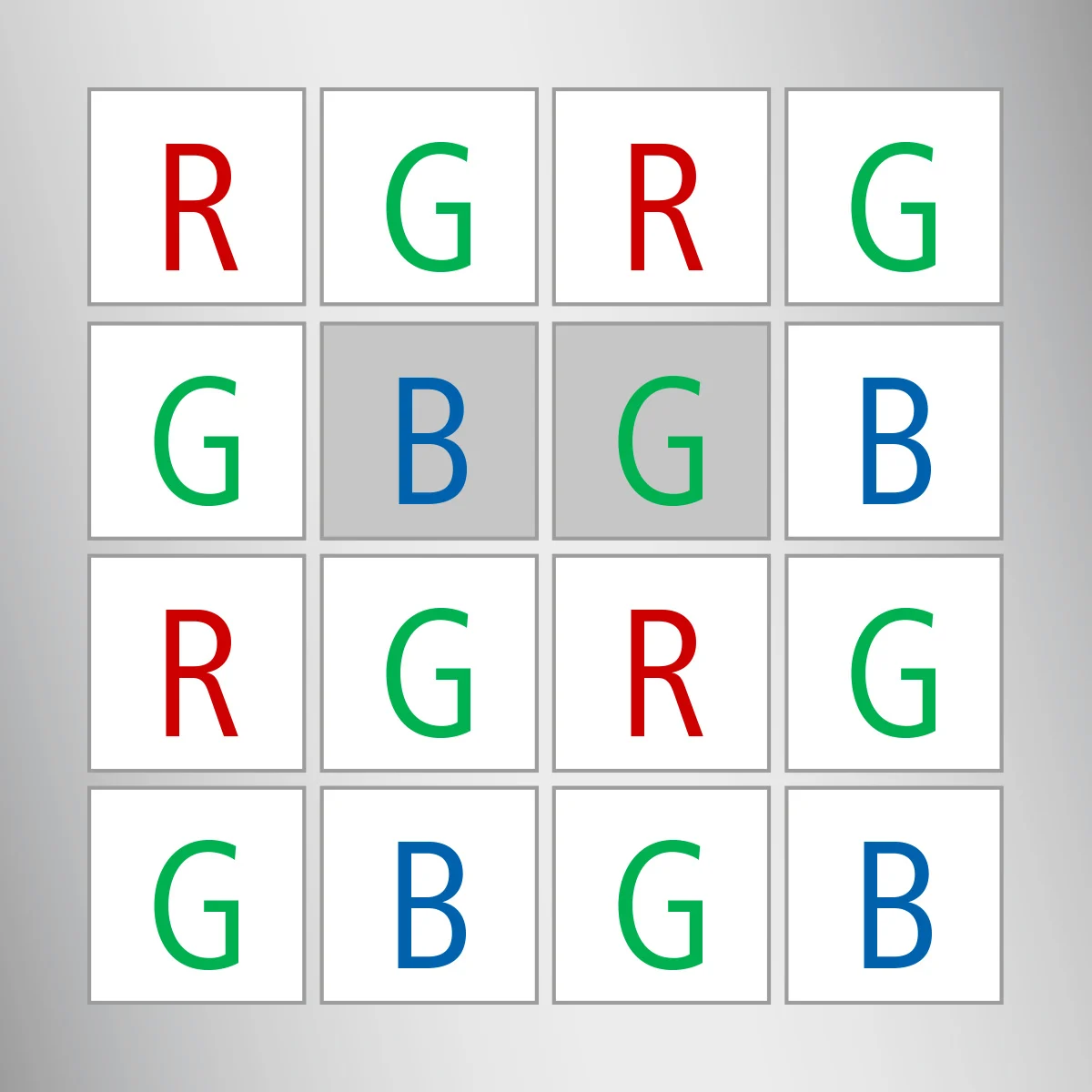
Bayer pattern is widely used in CCD and CMOS cameras. This pattern allows you to obtain color images from a single plane such that the R, G, and B pixels (the sensors of a particular component) are interlocked as shown in the image below.
The output RGB components of a pixel are obtained by interpolation from 1, 2 or 4 neighboring pixels of the same color. The above pattern has several modifications that can be achieved by shifting the pattern one pixel left and/or one pixel up.CV_Bayer C1C2 2BGRandCV_Bayer C1C2 2RGBThe two letters in the conversion constants C1 and C2 indicate the particular type of pattern. These are the components in the second and third columns of the second row, respectively. For example, the pattern above is a very popular “BG” It has the type.
‘cvtColor’ in OpenCV Color Conversion Using
Color cameras include raw PixelFormats such as BayerBG8, BayerGB8, BayerGR8 and BayerRG8. These formats need to be converted to BGR8 format for further image processing.
Baumer cameras name Bayer patterns based on the first two pixels in the first row of the image. In contrast, OpenCV naming depends on the second and third pixel in the second row of the image, leading to a different naming:
- Baumer BayerGBIn OpenCVBayerGRMatches with .
- Baumer BayerRGIn OpenCVBayerBGMatches with .
- Baumer BayerGRIn OpenCVBayer GBMatches with .
- Baumer BayerBGIn OpenCVBayerRGMatches with .
                pDevice->GetRemoteNode("PixelFormat")->SetString("BayerRG8");

BGAPI2::Buffer * pBufferFilled = pDataStream->GetFilledBuffer(1000);
if (pBufferFilled->GetPixelFormat() == "BayerRG8")
{
    cv::Mat* imOriginal = new cv::Mat((int)pBufferFilled->GetHeight(),
                                      (int)pBufferFilled->GetWidth(),
                                      CV_8UC1,
                                      (char *)pBufferFilled->GetMemPtr());
    cv::Mat* imTransformBGR8 = new cv::Mat((int)pBufferFilled->GetHeight(),
                                           (int)pBufferFilled->GetWidth(),
                                           CV_8UC3);

    //Baumer: RGrgrg >> OpenCV: rgrgrg
    //gbgbgb gBGbgb
    cv::cvtColor(*imOriginal, *imTransformBGR8, CV_BayerBG2BGR); //to BGR

    delete imOriginal;
    pBufferFilled->QueueBuffer();

    cv::imwrite("cv_BayerRG8_as_BGR8_image.png", *imTransformBGR8);
    delete imTransformBGR8;
}
                mDevice.RemoteNodeList["PixelFormat"].Value = "BayerRG8";

BGAPI2.Buffer mBufferFilled = mDataStream.GetFilledBuffer(1000);
if (mBufferFilled.PixelFormat == "BayerRG8")
{
    Emgu.CV.Mat imOriginal = new Emgu.CV.Mat((int)mBufferFilled.Height,
                                             (int)mBufferFilled.Width,
                                             Emgu.CV.CvEnum.DepthType.Cv8U, 1,
                                             (IntPtr)mBufferFilled.MemPtr,
                                             (int)mBufferFilled.Width * 1);
    Emgu.CV.Mat imTransformBGR8 = new Emgu.CV.Mat();

    //Baumer: RGrgrg >> OpenCV: rgrgrg
    //gbgbgb gBGbgb
    Emgu.CV.CvInvoke.CvtColor(imOriginal, imTransformBGR8,
                              Emgu.CV.CvEnum.ColorConversion.BayerBg2Bgr);

    mBufferFilled.QueueBuffer();

    Emgu.CV.CvInvoke.Imwrite("cv_BGR8_image.png", imTransformBGR8);
}
Conversion from Bayer to BGR16
Some raw PixelFormats use more bits in the Bayer image, for example BayerBG12, BayerGB12, BayerGR12 and BayerRG12. This raw data must first be converted from 12 bits to 16 bits. Then, the 16-bit valuecvtColorIt can be converted to BGR16 in 48-bit format (16 bits for each color channel) using
For 10-bit formats (for example, BayerBG10, BayerGB10, BayerGR10 or BayerRG10), you must use a scaling factor of 64.0 instead of 16.0 to convert them to 16-bit Bayer format.
                pDevice->GetRemoteNode("PixelFormat")->SetString("BayerGB12");

BGAPI2::Buffer * pBufferFilled = pDataStream->GetFilledBuffer(1000);
if (pBufferFilled->GetPixelFormat() == "BayerGB12")
{
    cv::Mat* imOriginal = new cv::Mat((int)pBufferFilled->GetHeight(),
                                      (int)pBufferFilled->GetWidth(),
                                      CV_16UC1,
                                      (char *)pBufferFilled->GetMemPtr());
    cv::Mat* imConvert = new cv::Mat((int)pBufferFilled->GetHeight(),
                                     (int)pBufferFilled->GetWidth(),
                                     CV_16UC1);
    //convert with scaling of 16.0 to convert 12-Bit to 16-Bit
    imOriginal->convertTo(*imConvert, CV_16UC1, 16.0);

    delete imOriginal;
    pBufferFilled->QueueBuffer();

    cv::Mat* imTransformBGR16 = new cv::Mat((int)pBufferFilled->GetHeight(),
                                            (int)pBufferFilled->GetWidth(),
                                            CV_16UC3);

    //Baumer: GBgbgb >> OpenCV: gbgbgb
    // rgrgrg rGRgrg
    cv::cvtColor(*imConvert, *imTransformBGR16, CV_BayerGR2BGR); //to BGR
    delete imConvert;

    cv::imwrite("cv_BayerGB12_as_BGR16_image.png", *imTransformBGR16);
    delete imTransformBGR16;
}
                mDevice.RemoteNodeList["PixelFormat"].Value = "BayerGB12";

BGAPI2.Buffer mBufferFilled = mDataStream.GetFilledBuffer(1000);
if (mBufferFilled.PixelFormat == "BayerGB12")
{
    Emgu.CV.Mat imOriginal = new Emgu.CV.Mat((int)mBufferFilled.Height,
                                             (int)mBufferFilled.Width,
                                             Emgu.CV.CvEnum.DepthType.Cv16U, 1,
                                             (IntPtr)mBufferFilled.MemPtr,
                                             (int)mBufferFilled.Width * 2);
    Emgu.CV.Mat imConvert = new Emgu.CV.Mat((int)mBufferFilled.Height,
                                            (int)mBufferFilled.Width,
                                            Emgu.CV.CvEnum.DepthType.Cv16U, 1);

    //convert with scaling of 16.0 to convert 12-Bit to 16-Bit
    imOriginal.ConvertTo(imConvert, Emgu.CV.CvEnum.DepthType.Cv16U, 16.0);

    mBufferFilled.QueueBuffer();

    Emgu.CV.Mat imTransformBGR16 = new Emgu.CV.Mat();

    //Baumer: GBgbgb >> OpenCV: gbgbgb
    // rgrgrg rGRgrg
    Emgu.CV.CvInvoke.CvtColor(imConvert, imTransformBGR16,
                              Emgu.CV.CvEnum.ColorConversion.BayerGr2Bgr);

    Emgu.CV.CvInvoke.Imwrite("cv_BayerGB12_as_BGR16_image.png", imTransformBGR16);
}
Downloads
Software Examples
Baumer GAPI and OpenCV