Sequencer Introduction
This application note introduces the general approach to using sequencers with Baumer industrial cameras.
The sequencer enables image series recording with automatic reparameterization of the camera based on different events and signals. Therefore, the desired camera settings for each step are stored in so-called sequencer sets. Combining these sets of sequencers creates a sequence. The connection of sequences is achieved using different pathways. Along with camera features, road related features are also part of a sequencer set.
Sequencer Sets
Sequencer sets combine camera properties (similar to a user set) and sequencer (set and path) related parameters.
Settings for various camera features as follows:
- exposure time
- Gain
- partial scan
- User exit
- counter
can be controlled by the sequencer and therefore recorded in a sequencer set. Additionally, the information required for the embankment traversal via four different paths is also recorded.
Each path includes:
- The target to which the set will be migrated, mapped with the SequencerSetNext property
- State change of the signal used to trigger the set transition, mapped as SequencerTriggerSource
- State change that triggers the set transition, mapped to SequencerTriggerActivation
As with user sets, when a sequencer set is loaded and the sequencer is activated, the camera's existing settings are overwritten.
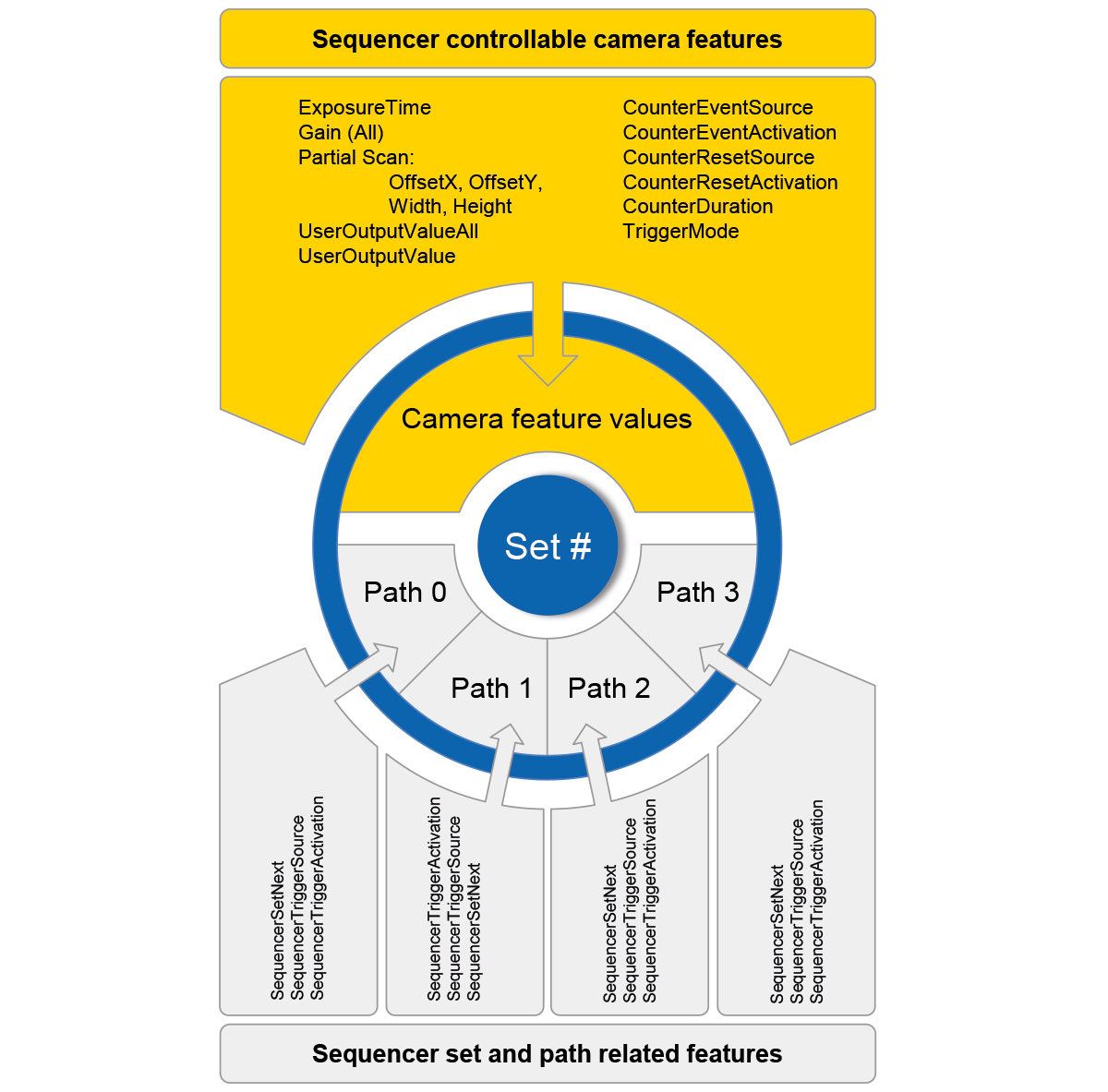
Configuration
The camera must be set to sequencer configuration mode to prevent existing camera settings from being overwritten when configuring the sequencer. Once the camera is placed in sequencer configuration mode, individual sequencer sets can be selected and configured with the SequencerSetSelector and saved with the SequencerSetSave command. To start the configured sequence, the sequencer configuration mode must be turned off and the sequencer mode must be enabled.
Command Overview
| feature | Values | Description |
|---|---|---|
| SequencerMode | On/Off | Enables/disables the sequencer mechanism. To use this featureSequencerConfigurationModeshould be closed. |
| SequencerConfigurationMode | On/Off | Enables/disables sequencer configuration mode. In this mode, sequencer configuration can be done, but image acquisition will not occur. To use this featureSequencerModeshould be closed. |
| SequencerFeatureSelector | ExposureTime, Gain (All), OffsetX, OffsetY, Width, Height, UserOutputValueAll, UserOutputValue, CounterEventSource, CounterEventActivation, CounterResetSource, CounterResetActivation, CounterDuration, TriggerMode | Selects camera features controlled by the sequencer. |
| SequencerFeatureEnable | true/false [RO] | Enables/disables the selected feature. |
| SequencerSetSelector | 0…127 | Selects the sequencer set containing the subsequent feature settings. |
| SequencerSetSave | Saves the current device settings to the selected sequencer set. | |
| SequencerSetLoad | Loads the currently selected sequencer set. | |
| SequencerSetActive | 0…127 [RO] | Shows the currently active sequencer set. |
| SequencerSetStart | 0…127 | Defines the initial sequencer set. |
| SequencerPathSelector | 0…3 | Then selects the path containing the subsequent settings. |
| SequencerSetNext | 0…127 | Defines the Next Set. |
| SequencerTriggerSource | Counter1End, Counter2End, ExposureActive, Line0, ReadoutActive, Timer1End, Off | Defines the internal or external event used as the trigger source for the sequence. |
| SequencerTriggerActivation | RisingEdge, FallingEdge, AnyEdge | Defines the edge of the signal that triggered the sequence. |
Note:Features marked in gray are only available in sequencer configuration mode.